Vector art
Icons from SVGs that stay crisp at any magnification, used in markup exactly like a raster sprite.
Which kind of art to use
| What you're drawing | Use | Why |
|---|---|---|
| Lines, arcs, outlines and flat shapes: gauges, needles, range rings, brackets, arrows | <path>, and <scale> for ticks and numbers | Sharp at any size and angle, one draw, and the shape can follow game data. Written as text, so an agent can draw it. |
| An icon or drawing that must stay sharp when magnified: a HUD icon also shown full screen, a world-space panel the player walks up to, a scale animation | A vector sprite (this page) | Exact edges at any size. One draw per colour layer. |
| Everything else: painted art, portraits, textures, photos, anything with shading, art only ever seen at one size | A raster sprite (images) | The cheapest: a whole sheet is one draw. |
Baking SVGs to sprites
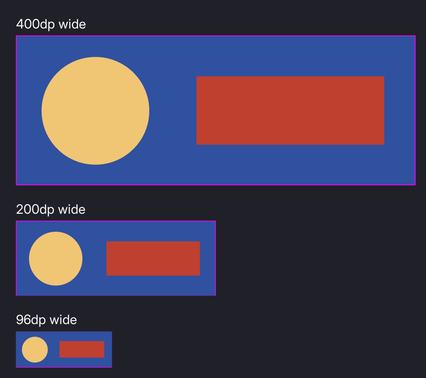
The SVGs are baked to the same kind of distance field the text uses, and <img sprite="icon_sword"> and decorator: image(icon_sword) work as they do for a PNG.
./bin/win64/msdfbake.exe vector --in art/ui/vector --out UI/art --rcss UI/vectors.rcss --layersThat packs the SVGs' fields into an atlas and writes a @spritesheet block between markers in UI/vectors.rcss. Link that stylesheet.
What a field can represent
A distance field is coverage and nothing else. One field is one silhouette.
Multi-colour art becomes a stack of silhouettes, one per fill colour, painted back to front. Still one atlas, at the cost of one draw per layer. Keep the colour count low.
A stack needs its frame image. Every layer is absolutely positioned, so the baker emits a <name>_frame sprite carrying the drawing's proportions, and a hidden <img> on it gives the box a height:
<div class="knight-stack" style="width: 240dp">
	<img class="knight-frame" sprite="knight_frame"/>
	<img class="knight_0-ink" sprite="knight_0"/>
	<img class="knight_1-ink" sprite="knight_1"/>
</div>
Set the width and let the frame find the height: an image element's intrinsic size is the only aspect ratio RCSS has.
A vector sprite scales uniformly or not at all, so ninepatch and tiled-box are invalid on a vector atlas.
The vector sheet is declared 1x. No second resolution to author.
Recolouring
Each layer is emitted with the colour the drawing used, as image-color. Override it and the art recolours:
.knight_0-ink { image-color: #f0c674; }
.knight_1-ink { image-color: #1f1f28; }
That composes with themes, and can be repainted at runtime.
Gradients
A gradient fill is baked to colour rather than to a field, onto a second sheet the baker writes alongside the atlas. The field still produces the edge, so the silhouette stays as crisp as any other vector layer; only the fill is a raster, and a gradient upscales almost invisibly.
A gradient layer is a sprite like any other, with no image-color.
| Affinity fill | |
|---|---|
| Linear | works |
| Radial | works |
| Elliptical | works (a radial with a non-uniform transform) |
| Conical | outline only. SVG has no conical gradient, and Affinity exports the fill as an embedded bitmap that the parser discards |
| Mesh | outline only. Same, and there is no mesh gradient in SVG to export to |
| Hatch | it is clipped geometry rather than a gradient, and bakes as flat layers |
The baker scans the source for paints it cannot carry and names each one with what to do instead:
msdfbake: warning: conical: art/conical.svg contains <image>
msdfbake:   an embedded bitmap. Affinity exports a conical or mesh gradient this way, because SVG
msdfbake:   has neither. Export that fill as a PNG and use it as a raster sprite.
msdfbake:   Gradients that do bake: linear, radial and elliptical.
The same check catches <pattern> fills, SVG <filter> effects, <meshgradient>, live <text> that was never converted to curves, and <use>, which the parser drops, so an instanced shape goes missing. Pass --strict to make any of them fail the run in a build.
What the baker handles
clip-pathis honoured. nanosvg discards it, so the baker reads it from the SVG and intersects the geometry with Skia's path operations. A clip path's own shape is a stencil and is never drawn.- Strokes are outlined into area, since a field has no notion of a line. Joins (miter with its limit, round, bevel) and caps (butt, round, square) are read from the SVG and honoured. A stroke costs its own layer, because it is its own colour.
- Overlapping contours are resolved. Art often draws a shape as several intersecting paths; a field would reconstruct a false edge through the overlap, so the baker unions them first.
Baking is not automatic
Re-run msdfbake vector after changing an SVG. Nothing watches the source art. Then reopen the document or run folio.ReloadTextures; uipreview picks it up through its file watcher.
Tuning the bake
--px-em | Field resolution per em. Higher is more precise and costs atlas area quadratically. |
--px-range | The field's width in texels. Raise it only to widen the reach of effects. |
--page | Atlas page size. One page per sheet; a spill is an error, because one @spritesheet names one image. |
--layers | Bake multi-colour art as a stack. Without it a drawing is one silhouette and extra fills are discarded with a warning. |
msdfbake dump --in <atlas> --png out.png writes the field out as an image, to check a bake looks like the drawing.
If it looks wrong
A multi-colour icon renders nothing. The stack's layers are absolutely positioned and add nothing to the container's height, so without its frame image the container collapses. Add the hidden <img> on <name>_frame, as in what a field can represent.
A vector stack squashes when the window aspect changes. It is sized as a percentage of both width and height, which resolve against different bases. Set width or height, not both.
A vector sprite has rounded corners and soft edges under ninepatch or tiled-box. Non-uniform stretching corrupts the distance metric. Use a raster sprite for anything that stretches.
A gradient layer comes out as a flat tint. It has an image-color, which multiplies the gradient. Remove it from that layer.
A conical or mesh fill bakes as an outline only. Affinity exports those as an embedded bitmap, which the parser discards. The baker warns: msdfbake: warning: conical: art/conical.svg contains <image>. Export that fill as a PNG and use it as a raster sprite.
A shape is missing from the bake. <use> is dropped by the parser, so an instanced shape goes missing. The baker warns about it, along with <pattern>, SVG <filter>, <meshgradient> and live <text>. Expand the instance or convert the text to curves, and pass --strict to fail a build on any of them.
A multi-colour drawing bakes as one flat silhouette. It was baked without --layers. The baker says msdfbake: warning: <name> has <n> fill colours, and one field holds one silhouette, so every filled path merges into a single shape. Re-run with --layers.
An edited SVG still shows the old art. Nothing watches the source, and RmlUi caches a texture by its path. Re-run msdfbake vector, then reopen the document or run folio.ReloadTextures.
Where to go next
- Images and sprites: the raster path, which is still the default.
- Text and fonts: the same fields, for glyphs.
- UI_CONVENTIONS.md §7: the full reference.