A grid inventory
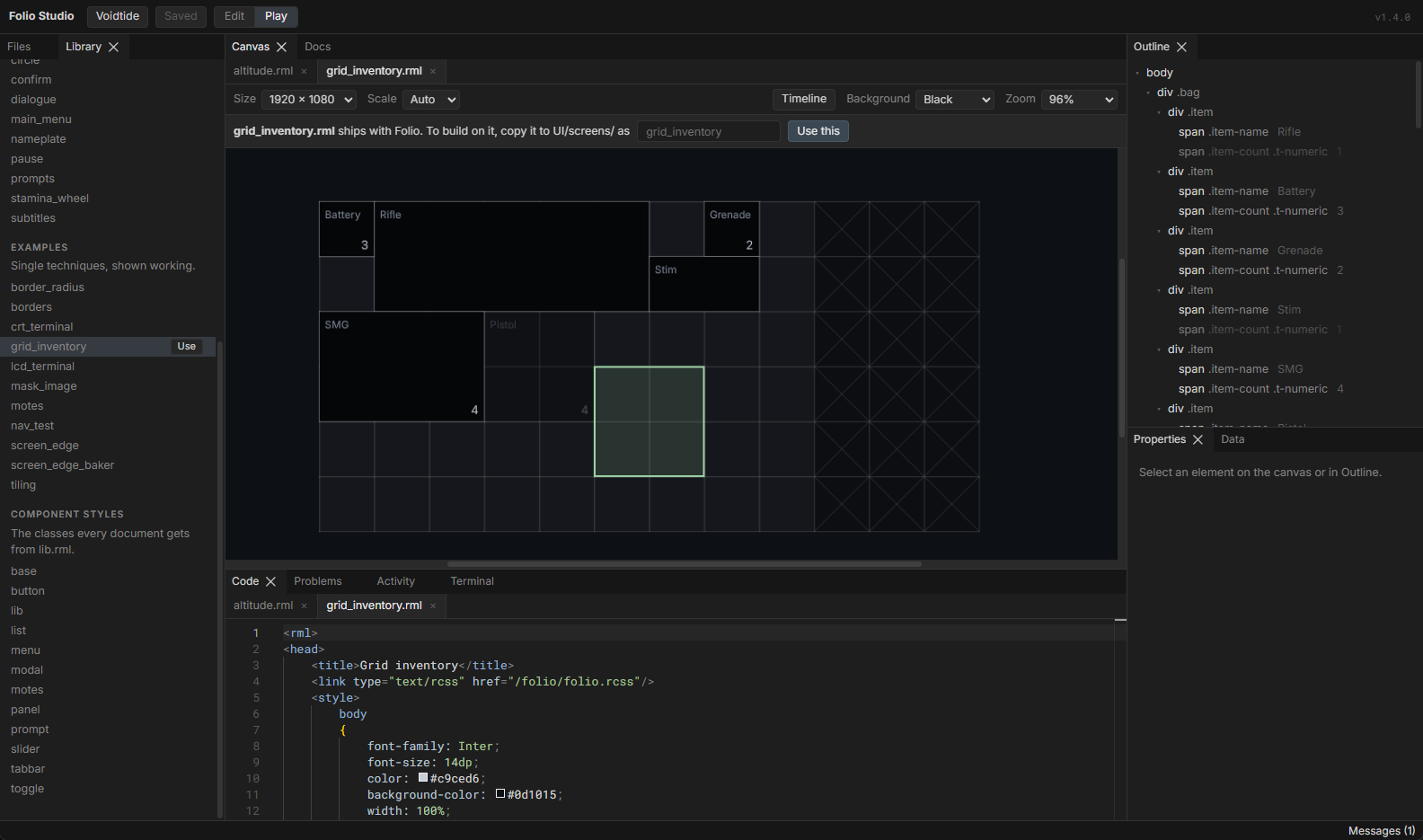
Items that take up several cells, dragged and placed on a grid: a rifle is five cells by two, a battery is one. Also called a Tetris or jigsaw inventory. The grid lines, the items, a ghost showing where a held item lands and turning red when it does not fit, locked cells, and the same pick-up-and-place on mouse, keyboard and pad.
Assumes an inventory screen, whose one-cell-per-item flexbox grid stops working as soon as an item spans cells.
The finished document is examples/grid_inventory.rml, with mock data in UI/mock/grid_inventory.json, which the preview mounts.
1. Three layers
<div class="bag" data-model="grid_inventory">
	<div class="item" data-for="it : Items"> ... </div>   <!-- what you see -->
	<div class="ghost" data-if="bHolding"></div>          <!-- where a held item lands -->
	<div class="cells"> ... </div>                         <!-- what you press -->
</div>- The bag draws the grid lines as its background, so an item painted on top covers them.
- The items are absolutely positioned, each sized in whole cells.
- The cells are one transparent element per cell, on top of everything. They take every press, drag and drop, and draw focus, so a focused cell shows even inside an item.
Every event lands on a cell, and a cell knows its index. The game turns that index into "which item" and "which cell of it".
2. The model
USTRUCT(BlueprintType)
struct FGridCell
{
	GENERATED_BODY()

	UPROPERTY(BlueprintReadOnly, Category = "Inventory") bool bOccupied = false;
	UPROPERTY(BlueprintReadOnly, Category = "Inventory") bool bLocked = false;
};

USTRUCT(BlueprintType)
struct FGridItem
{
	GENERATED_BODY()

	UPROPERTY(BlueprintReadOnly, Category = "Inventory") FString Name;
	UPROPERTY(BlueprintReadOnly, Category = "Inventory") int32 Count = 1;
	UPROPERTY(BlueprintReadOnly, Category = "Inventory") int32 X = 0;
	UPROPERTY(BlueprintReadOnly, Category = "Inventory") int32 Y = 0;
	UPROPERTY(BlueprintReadOnly, Category = "Inventory") int32 W = 1;
	UPROPERTY(BlueprintReadOnly, Category = "Inventory") int32 H = 1;
	UPROPERTY(BlueprintReadOnly, Category = "Inventory") bool bHeld = false;
};

UCLASS()
class UGridInventory : public UObject
{
	GENERATED_BODY()

public:
	static constexpr int32 Columns = 12;
	static constexpr int32 Rows = 6;

	UPROPERTY(BlueprintReadOnly, Category = "Inventory") TArray<FGridCell> Cells;
	UPROPERTY(BlueprintReadOnly, Category = "Inventory") TArray<FGridItem> Items;
	UPROPERTY(BlueprintReadOnly, Category = "Inventory") int32 HoverItem = INDEX_NONE;

	UPROPERTY(BlueprintReadOnly, Category = "Inventory") bool bHolding = false;
	UPROPERTY(BlueprintReadOnly, Category = "Inventory") int32 GhostX = 0;
	UPROPERTY(BlueprintReadOnly, Category = "Inventory") int32 GhostY = 0;
	UPROPERTY(BlueprintReadOnly, Category = "Inventory") int32 GhostW = 1;
	UPROPERTY(BlueprintReadOnly, Category = "Inventory") int32 GhostH = 1;
	UPROPERTY(BlueprintReadOnly, Category = "Inventory") bool bGhostFits = false;

	UFUNCTION(BlueprintCallable, Category = "Inventory") void PickUp(int32 Cell);
	UFUNCTION(BlueprintCallable, Category = "Inventory") void Hover(int32 Cell);
	UFUNCTION(BlueprintCallable, Category = "Inventory") void Drop(int32 Cell);
	UFUNCTION(BlueprintCallable, Category = "Inventory") void Confirm(int32 Cell);
	UFUNCTION(BlueprintCallable, Category = "Inventory") void Cancel();

	void Init(int32 LockedFromColumn);
	int32 ItemAt(int32 X, int32 Y, int32 Ignore = INDEX_NONE) const;
	bool Fits(int32 Item, int32 X, int32 Y) const;

private:
	void Release();
	void RefreshCells();

	int32 Held = INDEX_NONE;
	int32 GrabX = 0;
	int32 GrabY = 0;
};
Positions and sizes are in cells, not dp. The markup does the multiplying, so a change of cell size is a stylesheet edit.
BlueprintReadOnly on every property, BlueprintCallable on every command. Folio binds only what is marked; a plain UPROPERTY() stays invisible to the markup. A command must return void and take only bool, numbers, FString or FName. See data binding.
Bind before loading:
Inventory = NewObject<UGridInventory>(this);
Inventory->Init(9);
Document->BindViewModel(TEXT("grid_inventory"), Inventory);
Document->LoadDocument(TEXT("UI/screens/grid_inventory.rml"));
3. The rules
Five commands carry the interaction on every device.
void UGridInventory::Init(int32 LockedFromColumn)
{
	Cells.SetNum(Columns * Rows);
	for (int32 Index = 0; Index < Cells.Num(); ++Index)
	{
		Cells[Index].bLocked = Index % Columns >= LockedFromColumn;
	}
	RefreshCells();
}

int32 UGridInventory::ItemAt(int32 X, int32 Y, int32 Ignore) const
{
	for (int32 Index = 0; Index < Items.Num(); ++Index)
	{
		const FGridItem& Item = Items[Index];
		if (Index != Ignore && X >= Item.X && X < Item.X + Item.W && Y >= Item.Y && Y < Item.Y + Item.H)
		{
			return Index;
		}
	}
	return INDEX_NONE;
}

bool UGridInventory::Fits(int32 Item, int32 X, int32 Y) const
{
	const FGridItem& Moving = Items[Item];
	if (X < 0 || Y < 0 || X + Moving.W > Columns || Y + Moving.H > Rows)
	{
		return false;
	}

	for (int32 CellY = Y; CellY < Y + Moving.H; ++CellY)
	{
		for (int32 CellX = X; CellX < X + Moving.W; ++CellX)
		{
			// The item ignores itself, so it can be put down overlapping where it was.
			if (Cells[CellY * Columns + CellX].bLocked || ItemAt(CellX, CellY, Item) != INDEX_NONE)
			{
				return false;
			}
		}
	}
	return true;
}

void UGridInventory::PickUp(int32 Cell)
{
	const int32 Item = ItemAt(Cell % Columns, Cell / Columns);
	if (bHolding || Item == INDEX_NONE)
	{
		return;
	}

	// Which cell of the item was grabbed, so it stays under the pointer rather than snapping to its corner.
	GrabX = Cell % Columns - Items[Item].X;
	GrabY = Cell / Columns - Items[Item].Y;

	Held = Item;
	Items[Item].bHeld = true;
	GhostW = Items[Item].W;
	GhostH = Items[Item].H;
	bHolding = true;
	HoverItem = INDEX_NONE;
	Hover(Cell);
}

void UGridInventory::Hover(int32 Cell)
{
	if (!bHolding)
	{
		HoverItem = ItemAt(Cell % Columns, Cell / Columns);
		return;
	}

	GhostX = Cell % Columns - GrabX;
	GhostY = Cell / Columns - GrabY;
	bGhostFits = Fits(Held, GhostX, GhostY);
}

void UGridInventory::Drop(int32 Cell)
{
	if (!bHolding)
	{
		return;
	}

	Hover(Cell);
	if (!bGhostFits)
	{
		return;
	}

	Items[Held].X = GhostX;
	Items[Held].Y = GhostY;
	Release();
	RefreshCells();
}

void UGridInventory::Confirm(int32 Cell)
{
	if (bHolding)
	{
		Drop(Cell);
	}
	else
	{
		PickUp(Cell);
	}
}

void UGridInventory::Cancel()
{
	Release();
}

void UGridInventory::Release()
{
	if (Held != INDEX_NONE)
	{
		Items[Held].bHeld = false;
	}
	Held = INDEX_NONE;
	bHolding = false;
}

void UGridInventory::RefreshCells()
{
	for (int32 Index = 0; Index < Cells.Num(); ++Index)
	{
		Cells[Index].bOccupied = ItemAt(Index % Columns, Index / Columns) != INDEX_NONE;
	}
}
A drop that does not fit leaves the item held, which is right for click-to-place: the player tries somewhere else. A drag that ends somewhere it does not fit is put back by Cancel (§5).
Drop moves; it never swaps or merges. Swapping with the item under the ghost and merging stacks are game rules and belong in Drop, after Fits fails.
4. The grid lines
/* 12 x 6 cells on a 64dp pitch. The lines are the background, so items cover them. */
.bag
{
	position: relative;
	width: 769dp;
	height: 385dp;
	background-color: #ffffff08;
	decorator: repeating-linear-gradient(to right, #ffffff1f 0dp, #ffffff1f 1dp, #ffffff00 1dp, #ffffff00 64dp),
	           repeating-linear-gradient(to bottom, #ffffff1f 0dp, #ffffff1f 1dp, #ffffff00 1dp, #ffffff00 64dp);
}
Two repeating gradients, one per axis: one dp of line, then 63 of nothing. The width is 12 * 64 + 1 so the last line has room.
A tiled PNG (decorator: image(cell.png repeat)) does the same job when a cell needs more than a line, such as corner marks. A tile is its pixel size in dp, and a repeating image has to be its own file rather than an atlas sprite. See images.
5. The cells
<div class="cells">
	<div class="cell" data-for="cell : Cells"
		folio-label="Inventory cell"
		data-class-occupied="cell.bOccupied"
		data-class-locked="cell.bLocked"
		data-event-dragstart="PickUp(it_index)"
		data-event-dragover="Hover(it_index)"
		data-event-dragdrop="Drop(it_index)"
		data-event-dragend="Cancel()"
		data-event-mouseover="Hover(it_index)"
		data-event-focus="Hover(it_index)"
		data-event-click="Confirm(it_index)"></div>
</div>.cells
{
position: absolute;
left: 1dp;
top: 1dp;
width: 768dp;
display: flex;
flex-wrap: wrap;
}
/* 63dp and a 1dp gap. Cells that touch tie in the spatial search and focus drifts sideways. */
.cell
{
width: 63dp;
height: 63dp;
margin: 0 1dp 1dp 0;
flex: 0 0 auto;
box-sizing: border-box;
tab-index: auto;
nav: auto;
}
.cell.occupied { drag: drag-drop; }
.cell:focus-visible { border: 2dp #ffffffb3; }| Event | Command | Who |
|---|---|---|
dragstart | PickUp | mouse, pressing and moving on an item |
dragover, mouseover, focus | Hover | mouse during and outside a drag, keyboard and pad |
dragdrop | Drop | mouse, releasing a drag |
dragend | Cancel | mouse, any drag ending; a drop that landed has already released, so this only puts back one that did not |
click | Confirm | mouse click, keyboard enter, pad confirm |
A mouse can drag, or click to pick up and click to put down; a pad does the second with focus doing the pointing.
The 1dp gap is not decoration. RmlUi's spatial navigation scores a candidate by its distance plus a penalty for being off to the side, and two cells that share an edge are not off to the side at all. Down from the third cell in a row then ties the cells below the second and third, the first in document order wins, and focus walks one column left with every press. With a gap, only the cell straight below has no penalty. The cells start at 1dp so each gap falls on a grid line.
drag: drag-drop only on occupied cells. An empty cell has nothing to pick up, and drag-drop rather than drag is what makes RmlUi look for a drop target at all. See drag, drop and resize.
Pressing on the cell you picked up from fires both click and dragdrop. RmlUi sends click whenever the press and release land on the same element, drag or not. Confirm drops the item where it was, then Drop and Cancel find nothing held. The order works out; keep it in mind before adding a command that is not idempotent.
Back cancels. Escape and the pad's back button arrive on the widget, not in the document:
Document->OnBack.AddDynamic(this, &UMyInventoryScreen::HandleBack);

void UMyInventoryScreen::HandleBack()
{
	if (Inventory->bHolding)
	{
		Inventory->Cancel();
	}
	else
	{
		CloseInventory();
	}
}
6. The items
<div class="item" data-for="it : Items"
data-class-held="it.bHeld"
data-class-hover="it_index == HoverItem"
data-style-left="it.X * 64 + 'dp'"
data-style-top="it.Y * 64 + 'dp'"
data-style-width="it.W * 64 + 1 + 'dp'"
data-style-height="it.H * 64 + 1 + 'dp'">
<span class="item-name">{{ it.Name }}</span>
<span class="item-count t-numeric" data-if="it.Count > 1" data-noloc>{{ it.Count }}</span>
</div>.item
{
position: absolute;
box-sizing: border-box;
background-color: #050608;
border: 1dp #ffffff33;
padding: 6dp;
}
.item.hover { border-color: #ffffffb3; }
.item.held { opacity: 0.35; }
.item-name { font-size: 12dp; color: #8a93a3; }
.item-count { position: absolute; right: 6dp; bottom: 4dp; }The + 1 makes an item cover the grid line on its far side as well as its near one, so its border sits exactly on the lines.
For the item's picture, add an <img data-attr-sprite="it.Sprite"/> sized to fill the item, or render the meshes themselves: a paper doll, and 3D items in a grid.
The held item stays where it was, dimmed. drag-drop moves nothing; the ghost is the feedback. If the item itself should follow the pointer, that is drag: clone, and the ghost still answers "will it fit".
7. The ghost
<div class="ghost" data-if="bHolding"
	data-class-blocked="!bGhostFits"
	data-style-left="GhostX * 64 + 'dp'"
	data-style-top="GhostY * 64 + 'dp'"
	data-style-width="GhostW * 64 + 1 + 'dp'"
data-style-height="GhostH * 64 + 1 + 'dp'"></div>.ghost
{
position: absolute;
box-sizing: border-box;
border: 2dp #9fd3a6;
background-color: #9fd3a626;
}
.ghost.blocked
{
border-color: #e06c75;
background-color: #e06c7526;
}Colour comes from a class, not from data-style-*, so it rethemes from the stylesheet.
The ghost can hang off the edge of the grid, because GhostX is wherever the grab point puts it. It is red there.
8. Locked cells
.cell.locked
{
	background-color: #00000066;
	decorator: linear-gradient(45deg, #ffffff00 49%, #ffffff1f 50%, #ffffff00 51%),
	           linear-gradient(-45deg, #ffffff00 49%, #ffffff1f 50%, #ffffff00 51%);
}
A cross from two diagonal gradients, no art. Fits already refuses a locked cell, so unlocking a column in an upgrade is bLocked = false on its cells and nothing else.
9. Check it
./bin/win64/uipreview.exe examples/grid_inventory.rml --strict --a11y
./bin/win64/uipreview.exe examples/grid_inventory.rml --keys "tab,right,right,down,down,left" --shot-each out/
The mock has the pistol held and a ghost placed, so one screenshot shows every state. Set bGhostFits to false in UI/mock/grid_inventory.json to see the red one.
The preview binds the commands as no-ops and says so (I-DATA-EVENTSTUB), so nothing moves there. It proves the layout and the navigation: the --keys report lists each focused cell's rect, and a column that drifts shows up as an x that changes on a down.
What you have learned
- three layers: lines as background, items in the middle, cells on top for input (§1)
- a model in cells, and commands that serve mouse, keyboard and pad alike (§2, §3)
- keeping the grabbed cell under the pointer with a grab offset (§3)
- grid lines from two repeating gradients (§4)
- why touching cells break spatial navigation, and the 1dp fix (§5)
clickanddragdropboth firing on a release over the start cell (§5)- a ghost that shows fit before the drop (§7)
Where to go next
- An inventory screen: one item per cell, and the detail pane.
- A paper doll, and 3D items in a grid: rendered meshes in the cells.
- Drag, drop and resize: the complete vocabulary.
- Input and navigation: spatial navigation and
OnBack.