A frosted glass window
A window frame that blurs whatever is behind it, while its title, buttons and contents stay sharp.
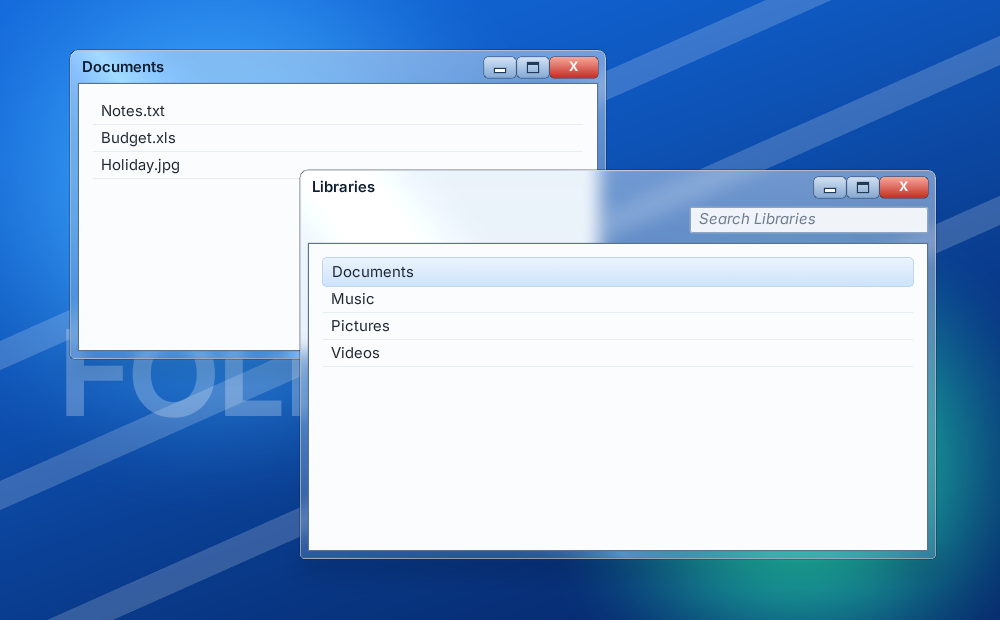
The finished document is examples/glass_window.rml:
./bin/win64/uipreview.exe examples/glass_window.rml --root . --size 1000x620 --dp-ratio 1 --strict1. The glass
Five properties on the window element:
.window {
	border-radius: 8dp 8dp 4dp 4dp;
	border: 1dp #0a1a3299;
	background-color: #7fb2e533;
	backdrop-filter: blur(8dp);
	box-shadow: #00000080 0 6dp 24dp 0, #ffffff80 0 0 0 1dp inset;
	decorator: shader("sweep #ffffff26 0.3 0.35 -25"),
	           vertical-gradient(#ffffff59 #ffffff0d);
}| Property | Gives |
|---|---|
backdrop-filter: blur(8dp) | The frosting: blurs what is behind the element, never the element or its children. |
background-color | The tint. Keep the alpha low (33 here); an opaque background hides the blur. |
box-shadow | A drop shadow, plus a 1dp white inset rim for the glass edge. |
vertical-gradient | The gloss: bright at the top, fading down. |
shader("sweep ...") | The diagonal streak. It adds light rather than covering. See the shader decorator. |
2. Sharp contents
Give the content area its own opaque background, and pad the window so a band of glass shows around it:
.window { padding: 0 7dp 7dp 7dp; }
.client { background-color: #fbfcfe; }
When it goes wrong
| Symptom | Cause |
|---|---|
| The text and buttons blur too | filter: blur() is on the window. It blurs the element and everything inside it; use backdrop-filter. |
| No blur visible | The background is too opaque, or nothing busy is behind the window. |
| The streak or gloss does nothing | It is listed after an opaque decorator. The first decorator is drawn on top. |
| No blur on a world document | Layer effects work only in Surface mode. |
| Blur looks different in the VSCode preview | The preview does not match the engine for layer effects. Judge it in the engine. |
Going further
- A blurred backdrop behind a modal:
backdrop-filter: outside-blur(6dp)blurs everything except the element. - Cost: each element with
backdrop-filterorbox-shadowis its own offscreen pass.--strictreports the count. Never animate itswidthorheight; animatetransforminstead.