Rich text, terms and the typewriter
A line of dialogue has emphasis in the middle, names that have to read the same everywhere, pacing, and it has to be translatable as one string, so a translator can move the emphasis onto whichever word carries it in their language. <text> is that string.
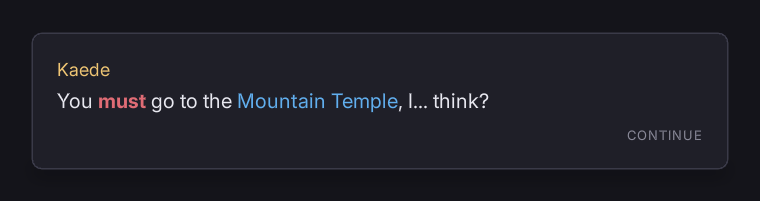
<text class="line" data-loc="line_1">You <angry>must</> go to the {tag:Place.Mountain.Temple},
I{delay:0.2}...{/} think?</text>.line { reveal: typewriter; reveal-rate: 45; reveal-punctuation: 0.18; }
.angry { color: #e06c75; font-weight: bold; }
.term { color: #61afef; }"must" is bold and red. "Mountain Temple" comes out of a table shared by the whole game and carries that table's colour. The ellipsis types slowly and the words after it go back to normal speed.
What is inside a <text> is not RML. It is read raw and parsed by Folio, so <angry> is a style rather than an element and {tag:} is a term rather than a data binding. A translation is a string, and cannot introduce elements into a document: anything a translator sends back is markup Folio reads, never markup RmlUi parses.
The grammar
<style>words</> | Applies the class style to what it encloses. </style> also works where naming it reads better. |
{tag:Some.Thing} | Substitutes a name from UI/terms. Does not enclose anything. |
{delay:0.2}slow{/} | Every character inside waits 0.2s. The one after it goes back to the rate. |
{pause:0.5} | Waits once, before the next character. |
{br} | A line break. |
\< \> \{ \} \\ | The literal character. |
Styles nest, and the classes accumulate: <angry><whisper>x</></> puts class="angry whisper" on the run. </> and {/} each close the nearest of their own kind.
A style tag becomes a class of the same name. Folio has no fixed vocabulary: <angry> means whatever .angry says. The default theme ships .angry, .shout, .soft, .aside and .term as a starting point; rename, add or delete. A tag your writers use needs a rule somewhere, or the word it marks silently renders as ordinary text.
Whitespace collapses, so a long line can be indented.
Terms
A term is a name written once: a place, a character, an item, a quest. Every document and translation refers to it by tag, so the name is translated once.
# UI/terms/places.terms
@class term

Place.Mountain.Temple = Mountain Temple
Place.Village.Kurogane = Kurogane Village
One file per group of names, all loaded at startup, all merged. @class names the style class every entry in that file carries, so a place reads differently from the sentence around it.
Tags are strings that look like gameplay tags, and nothing checks them against a gameplay tag registry: the table is UI data. A term defined twice is an error naming both files.
Tag:form = ... adds a named form of an entry, reached as {tag:Place.Mountain.Temple:gen}. English uses none. It is for languages that inflect a name.
These are files rather than engine data because the preview tool has no engine.
folio.Termsprints every loaded term and what it resolves to.folio.Terms.Reloadreads the tables again and rebuilds every open document. Saving a.termsfile does the same with hot reload on.
The typewriter
reveal: typewriter types the line out one character at a time, each fading in.
All of it is RCSS and inherited, so a game sets how its dialogue reads once:
reveal | none | typewriter | Off by default; a <text> is then styled text. |
reveal-rate | number | Characters per second. 45 is conversational, 90 is brisk. |
reveal-fade | number | Seconds each character takes to fade in. |
reveal-rise | length | How far each character lifts as it appears. 0 for none. |
reveal-punctuation | number | Extra seconds after . ! ?, half that after , ; :. |
reveal-sound | string | Named and reported, never played. See below. |
reveal-start | auto | manual | manual waits for the game to call Play(). |
reveal-punctuation is the one to tune: an even stream of characters reads flat, and a beat after a full stop is most of what makes it sound like someone talking. {delay:} and {pause:} are for moments the writer wants specifically.
The element carries its own state
.line.is-revealing ~ .continue { opacity: 0; }
.line.is-revealed  ~ .continue { opacity: 1; }
A continue prompt that appears when the line has finished is a stylesheet rule. revealcomplete is dispatched as well, for code.
Driving it from the game
A line the game owns (dialogue from a script asset, a quest description, a log entry) does not live in the document:
Document->SetElementMarkup(TEXT("line"), Line.ToString());That replaces the <text>'s markup and starts it revealing. The string is game text, translated through whatever asset it came from, so the element carries data-noloc rather than a key.
OnTextRevealed reports the id of a line that has finished, whether it ran to the end or was skipped. SkipElementReveal, IsElementRevealing and GetElementRevealDuration are for the input and the auto-advance.
Author the document with a line in it anyway, marked data-noloc: the game overwrites it, and the screen can be previewed.
Skipping
To complete a line at once:
if (Folio::Text::FElementRichText* Text = Folio::Text::AsRichText(
		Canvas->GetDocument()->GetElementById("line")))
{
	Text->Skip();
}
Play() restarts it, IsRevealing() and IsComplete() say where it is, and GetDuration() is how long it takes from the start, for an auto-advance timer.
folio.Text.Skip does the same to every revealing line.
The player's speed
Two settings, for an options menu:
UFolioAccessibilityLibrary::SetTextSpeed(2.0f);      // 1 is as authored
UFolioAccessibilityLibrary::SetInstantText(true);    // every line arrives whole
The multiplier divides the whole schedule: reveal-rate, an authored {delay:0.2} and the punctuation beats all move together. A line that pauses before a name still pauses, proportionally.
Instant text skips rather than never starting, so revealcomplete still fires and an auto-advance timer waiting on it still runs.
Neither is part of reduced motion: somebody can need menus still and dialogue paced, or instant text and every transition intact. See presentation settings.
uipreview --text-speed 4 and --instant-text preview both.
Sound
reveal-sound: "dialogue-blip" names a sound and plays nothing, in keeping with the rest of UI sounds. The game hears about it:
void UMyAudioSubsystem::Initialize(FSubsystemCollectionBase&)
{
	FFolioModule::Get().OnTextRevealSound().AddUObject(this, &UMyAudioSubsystem::PlayNamedSound);
}
At most once a frame, however fast the text is typing.
How it is drawn, and why that matters
The runs become real elements (<angry>x</> is a <span class="angry">), so wrapping, alignment, line height, nesting and theming are RmlUi's, as for any other text. The contrast check sees them too.
While a line is revealing, those spans are visibility: hidden and Folio draws the glyphs itself, reading back the lines RmlUi laid out and painting each glyph with its own alpha. So:
- The text never moves. Every character is laid out from the first frame, so the line wraps once, before anything is visible.
- Shaping is intact. Each run is shaped whole, so ligatures, kerning and mark attachment are what they would be without a reveal.
- It costs a mesh per frame while it types, and nothing once it stops. On the last character the spans are shown again and RmlUi draws them from geometry it generates once.
A <text> with reveal: none never takes that path.
Translating it
The markup is part of the string, and a translator sees it, as with Unreal's own rich text. Three things make it safe:
gather_rml.pywrites a translator brief beside the generated header: what the tags mean, what each{tag:}prints in English, and which strings carry which. Unreal's PO export has no room for a note against a string, so it travels beside the PO.The gather fails on bad markup. An unclosed tag, an unknown directive or a term with no entry is an error with a file and a line, before anything ships.
What comes back is checked:
Shell ./scripts/loc.sh --check-po Folio.poEvery translation is parsed. A retyped tag, an invented style or an unclosed one is an error; a translator dropping a term is a warning, because writing a name out in full is a legitimate call when grammar demands it.
Terms are gathered into their own namespace, Folio.Terms, keyed by tag. A name is translated once there and every line that mentions it follows.
--culture pseudo inflates and accents the words and leaves the tags exactly as they were. See Localisation.
Limits
- One
data-loccovers the whole line, so a<text>cannot contain an<img>, a binding or any other element. It is prose. {{ }}data expressions do not work inside it. The braces belong to the markup. A line that has to name the player is a job for a term or forSetMarkupfrom game code.text-transformand the reveal disagree. The reveal walks the laid-out characters against the ones it parsed; a transform that changes their length makes it fall back to revealing in order, which is usually but not always right.- Right-to-left text reveals left to right. Bidi is a known gap in the text engine generally.
See also
- Localisation: the gather, the namespaces and the whole pipeline.
- Text and fonts: faces, weights and font effects, which apply here as they do anywhere.
rcss/recipes/dialogue.rml: a working dialogue box to copy.