A list of ten thousand items
A quest log, a chat scrollback, a crafting catalogue, a leaderboard. data-for over the whole array builds one element per item, and at ten thousand items it builds ten thousand elements and throws most of them away every time the list changes.
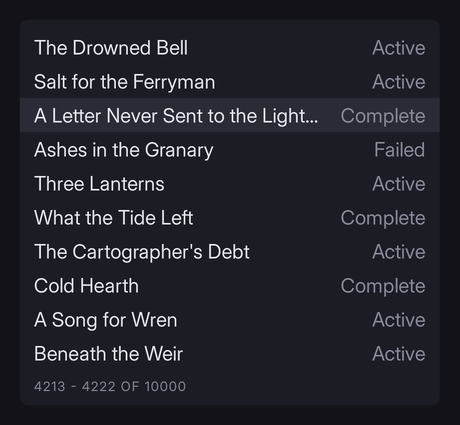
The version below does no allocation after the first frame. It is a model-side pattern, not a Folio API: nothing in the markup gives it away.
Read the inventory first. This is the same data-for, bound differently.
What Folio already does for you
Per-element state is pooled. An element's event dispatcher, style, background and border, effects, scroll state and computed values are taken from a pool rather than allocated, so creating an element is cheap.
An idle document does no work. The invalidation path skips updating anything that has not changed, so a list that is merely on screen costs a repaint from compiled geometry, not a layout.
A few hundred rows are fine. The churn hurts: rebuilding the array tears down every element and builds it again.
Bind the window, not the array
Expose a fixed-size view whose contents shift as you scroll.
data-for takes its row count from the bound variable's size. If the bound variable is always twenty long, the document has twenty rows forever. Scrolling creates and destroys nothing; it changes what those twenty rows say.
UCLASS()
class UQuestLogModel : public UObject
{
	GENERATED_BODY()

public:
	/** Everything there is. The document never sees this. */
	TArray<FQuestEntry> All;

	/** Exactly what is on screen. Never resized after construction. */
	UPROPERTY() TArray<FQuestRow> Window;

	/** Index into All that Window[0] currently shows. */
	UPROPERTY() int32 First = 0;

	/** For the scrollbar and for "23 of 10,000". */
	UPROPERTY() int32 Total = 0;

	void Rebuild()
	{
		// Sized once, in the constructor. Resizing it here would put the count back into the
		// document and undo the whole point.
		for (int32 Row = 0; Row < Window.Num(); ++Row)
		{
			const int32 Index = First + Row;
			Window[Row] = All.IsValidIndex(Index) ? MakeRow(All[Index]) : FQuestRow();
		}
	}
};// Once, at construction.
Window.SetNum(kVisibleRows);The markup is ordinary:
<div class="log" data-model="questlog">
	<div class="row" data-for="row : Window" data-class-blank="row.bEmpty">
		<span class="row-name">{{ row.Name }}</span>
		<span class="row-state c-dim">{{ row.State }}</span>
	</div>
</div>

<p class="t-caption c-dim">{{ First + 1 }} - {{ First + Window.size }} of {{ Total }}</p>
Nothing here knows the list is windowed: it is the same markup as for a short list, and switching between the two is a model change alone.
Scrolling it
The window moves; the rows do not.
void UQuestLogModel::ScrollBy(int32 Rows)
{
	const int32 Limit = FMath::Max(0, All.Num() - Window.Num());
	const int32 Wanted = FMath::Clamp(First + Rows, 0, Limit);

	if (Wanted == First)
	{
		return;
	}

	First = Wanted;
	Rebuild();
}
Drive it from a mouse wheel event, the navigation keys or a scrollbar you render yourself. The document reacts because the bound values changed.
Keep Window.Num() a little larger than what fits, by two or three rows. A window sized exactly to the visible area pops at the boundary; a couple of spare rows scrolled under the clip make the motion continuous.
Rows that are always the same height
The window only works if a row's height does not depend on its content. Otherwise the scroll offset and the pixel position disagree, and the list drifts as you move through it.
.row {
	height: 34dp;
	box-sizing: border-box;
	overflow: hidden;
	white-space: nowrap;
	text-overflow: ellipsis;
}
text-overflow takes clip, ellipsis, or a string.
Rows that must vary in height need a measured-offset scheme, which is much more work. Prefer fixed rows.
Navigation
The rows are recycled, so focus cannot live on a row: it would jump to a different item as soon as you scrolled.
Track the selection in the model and move the window to follow it:
void UQuestLogModel::MoveSelection(int32 Delta)
{
	Selected = FMath::Clamp(Selected + Delta, 0, All.Num() - 1);

	// Keep the selection inside the window, with a margin so it never sits against an edge.
	const int32 Margin = 2;
	if (Selected < First + Margin)              { First = FMath::Max(0, Selected - Margin); }
	if (Selected > First + Window.Num() - Margin) { First = Selected - Window.Num() + Margin; }

	Rebuild();
}<div class="row" data-for="row : Window" data-class-selected="First + it_index == Selected">The list itself is one focusable element, and up and down are its own:
.log { tab-index: auto; nav: vertical; }
.row.selected { background-color: #2b2b36; }
That also gives gamepad support, and suits a screen reader better than focusing rows: "item 23 of 10,000" rather than twenty recycled boxes.
Filtering and sorting
Both are operations on All, not on the window. Filter into an index array, and let the window read through it:
void UQuestLogModel::SetFilter(const FString& Text)
{
	Visible.Reset();
	for (int32 Index = 0; Index < All.Num(); ++Index)
	{
		if (Matches(All[Index], Text)) { Visible.Add(Index); }
	}

	Total = Visible.Num();
	First = 0;
	Rebuild();     // Window.Num() is unchanged, so still no allocation.
}
A filter that removes 9,000 of 10,000 items costs one pass over the source and twenty row writes. The document does not lay anything out that was not already on screen.
When not to bother
Under a few hundred rows, data-for over the whole array is simpler and fast enough.
Reach for the window when either is true:
- the list can be thousands of items
- the list churns: a chat log, a combat feed, anything appending several times a second
The second is the one people miss. A hundred-row list that rebuilds ten times a second builds and destroys a thousand elements a second, and shows up in a profile long before a static ten-thousand-row list does.
Proving it
./bin/win64/uipreview.exe UI/screens/questlog.rml --root . --data UI/mock/questlog.json --strictIn the engine, watch elements created per frame in stat Folio. With a window it is zero after the first frame: scrolling changes values, and values do not allocate.
folio.Invalidation.Trace tells you why a document is not idling, which finds a binding that dirties itself every frame.
See performance and profiling.
What you have learned
- what Folio pools for you, and why the naive version is fine at small sizes (§1)
- binding a fixed-size window instead of the array, so the row count never changes (§2)
- moving the window instead of the rows (§3)
- why rows must be a fixed height (§4)
- keeping focus and selection off recycled elements (§5)
- filtering as an operation on the source, not the view (§6)
Where to go next
- An inventory screen: the short-list version, with drag and drop.
- Data binding: the binding vocabulary in full.
- Performance and profiling: measuring rather than guessing.