A weapon falloff graph
A weapon card with a damage-over-range curve drawn by <line-graph>, fed from a mock JSON file first and from game code after. Then heat colouring, points and patterned fills.
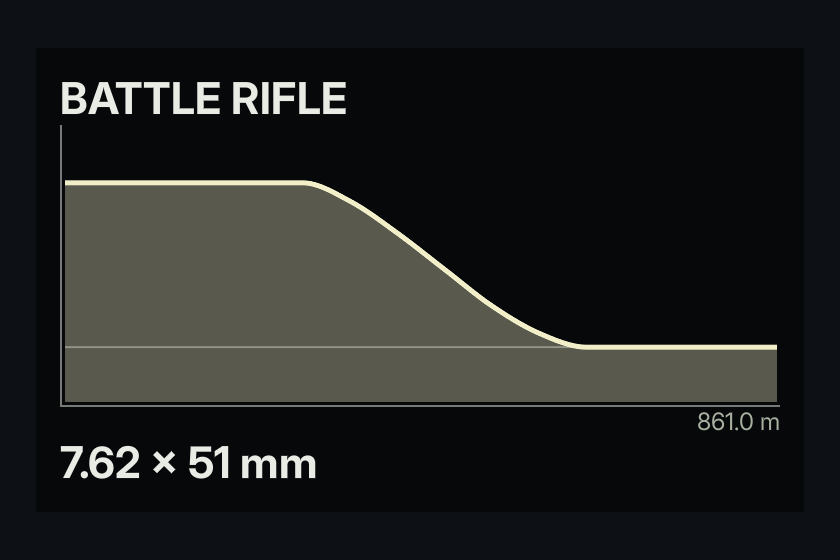
The finished document is examples/weapon_falloff.rml, with mock data in UI/mock/weapon_falloff.json:
./bin/win64/uipreview.exe examples/weapon_falloff.rml --root . --strict1. The mock
values takes one string of numbers, not a JSON array:
{
	"Name": "BATTLE RIFLE",
	"Calibre": "7.62 x 51 mm",
	"Range": "861.0 m",
	"Damage": "48 48 48 48 48 48 44 37 29 21 15 12 12 12 12 12",
	"MaxDamage": 60,
	"MinDamage": 12
}
Save it as UI/mock/<model>.json, named after the document's data-model. The preview mounts it whenever no game code is bound.
2. The markup
<div class="card" data-model="weapon_falloff">
	<span class="name">{{ Name }}</span>
	<line-graph data-attr-values="Damage" data-attr-max="MaxDamage" data-attr-average="MinDamage"></line-graph>
	<span class="axis">{{ Range }}</span>
	<span class="name">{{ Calibre }}</span>
</div>
max is the value at the top of the graph; min, left out here, is 0 at the bottom. So the numbers stay in damage, not fractions. average draws a horizontal line at a value, used here as the damage floor.
3. The style
line-graph
{
	display: block;
	height: 140dp;
	border-left: 1dp #e8ece480;
	border-bottom: 1dp #e8ece480;
	graph-mid-color: #f2efc8;
	graph-average-color: #e8ece460;
	graph-dot-size: 0;
	graph-curve: smooth;
	graph-fill-opacity: 0.35;
}
The graph has no size of its own, so give it a height. The borders are the axes. With no tones, the line draws in graph-mid-color. graph-dot-size: 0 removes the dot on the newest value, which suits a fixed curve rather than a live reading.
Edit a number in the mock and save: the preview redraws.
4. Heat, points and patterns
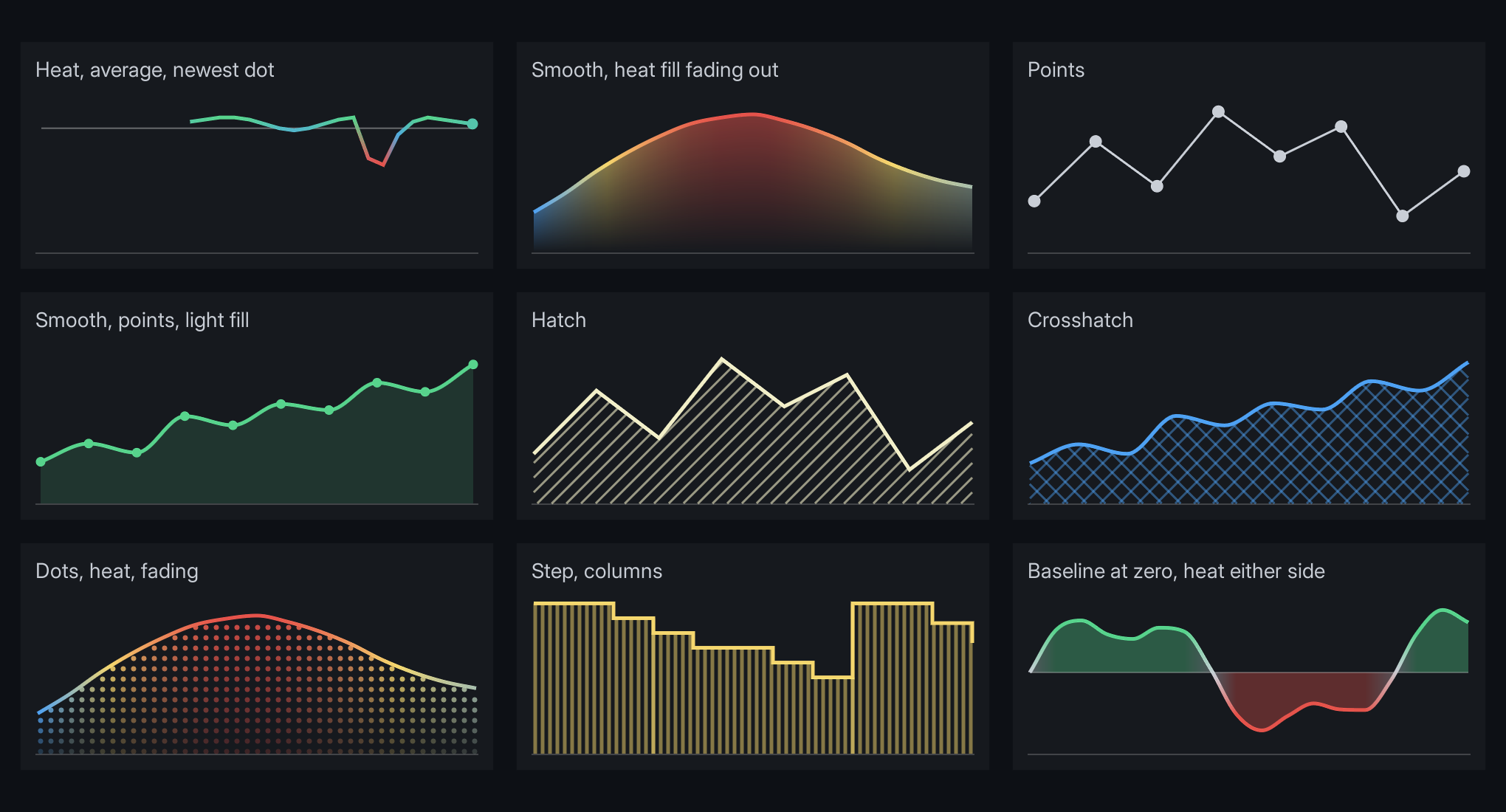
These are all in examples/line_graph_styles.rml.
Heat. Add a tone per value, from -1 (graph-low-color) through 0 (graph-mid-color) to 1 (graph-high-color). The line and the fill blend between them.
"Fps": "58 59 60 41 38 52 58",
"FpsTones": "0.8 0.9 1.0 -0.9 -1.0 0.2 0.8"<line-graph data-attr-values="Fps" data-attr-tones="FpsTones" min="0" max="70"></line-graph>Points on every value:
line-graph { graph-point-size: 8dp; graph-line-width: 1dp; }Fill, solid or patterned, fading toward the bottom:
line-graph
{
	graph-fill-opacity: 0.6;
	graph-fill-pattern: hatch;   /* solid, hatch, crosshatch, columns, rows, dots */
	graph-fill-spacing: 7dp;
	graph-fill-width: 1dp;       /* line width, or dot diameter */
	graph-fill-fade: 0.8;
}
Curve: graph-curve: smooth for a curve through every value, step for a value that holds until it changes, like ammunition.
Either side of zero: set baseline="0" with min below zero, and the fill reaches up or down to it.
5. From game code
Give the view model an FString and build it the same way, numbers joined by spaces:
void UWeaponCard::Refresh(const UWeaponData& Weapon)
{
	constexpr int32 Samples = 32;
	Damage.Reset();
	for (int32 Index = 0; Index < Samples; ++Index)
	{
		const float Metres = Weapon.MaxRange * Index / (Samples - 1);
		Damage.Appendf(TEXT("%.1f "), Weapon.DamageAt(Metres));
	}
	MaxDamage = Weapon.MaxDamage;
	MinDamage = Weapon.MinDamage;
}
Bind it under the same name as the mock, weapon_falloff, and the mock steps aside. See Data binding for hosting and binding.
Troubleshooting
Values can only be retrieved from scalar data typesandCould not get value from data variable 'Damage': the mock has an array ([48, 44]). Make it a string ("48 44").{{ Name }}shows literally: the mock file name does not matchdata-model.- Nothing draws: the graph has no height, or the string has something that is not a number in it. Parsing stops at the first one.
- The curve sits flat along the top or bottom: the values are outside
mintomax. - No fill:
graph-fill-opacityis 0 by default.
Going further
- A live reading (frame rate, speed): append a value each tick, drop the oldest, and set
lengthso the line grows from the right instead of stretching. Keepgraph-dot-sizefor the newest value. - Every attribute and property is in Line graphs.