Paths
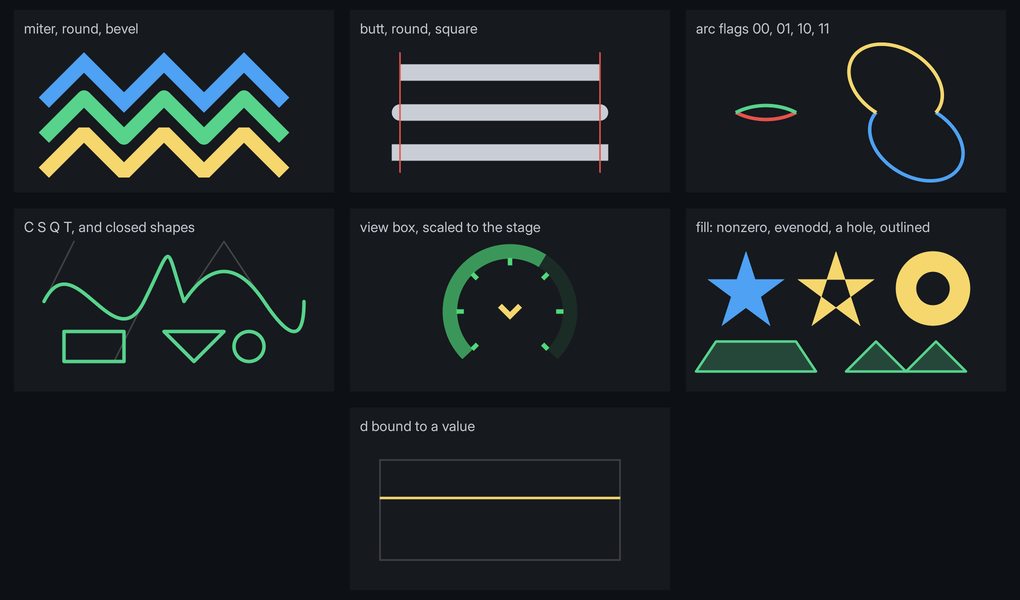
<path> draws an SVG path: lines, curves and arcs, stroked with any join and cap, filled, or both. The whole path is one mesh and one draw, and d binds to data, so a gauge's arc, a chevron or a needle can follow the game.
<path viewbox="0 0 100 100" d="M 20 80 A 40 40 0 1 1 80 80"/>path { display: block; width: 120dp; height: 120dp; color: #4fd879; path-width: 6dp; path-cap: round; }The stroke is drawn in color. For a filled shape with no outline:
.arrowhead { path-fill: #f5d76e; path-width: 0dp; }Every path above is in examples/path_styles.rml, with its data in UI/mock/path_styles.json.
Attributes
d | SVG path data. Every command, either case: M L H V C S Q T A Z. |
fill-rule | nonzero (the default) or evenodd: which overlaps of the shape count as inside. |
viewbox | min-x min-y width height. The user space fitted into the content box, centred and uniformly scaled, as SVG's default. Without it a user unit is 1dp from the content box's top-left corner. |
Bind any of them with data-attr-*. A straight line can follow a value with arithmetic alone:
<path data-attr-d="'M 0 ' + (100 - Level) + ' H 200'"/>Arcs and wedges from a value
Two transforms build path data for a gauge, with angles in degrees clockwise from straight up:
<path data-attr-d="Speed | arc(150, 100, 94, -135, 135)"/>
<path data-attr-d="Heat | wedge(150, 100, 100, 90, 135, 94)"/>| Transform | Draws |
|---|---|
Fraction | arc(cx, cy, r, start, end) | An arc of radius r round (cx, cy), from start as far as Fraction of the way to end. |
Fraction | wedge(cx, cy, r, start, end) | The same, closed through the centre into a pie slice for path-fill. |
Fraction | wedge(cx, cy, r, start, end, inner) | A ring segment between inner and r. |
Fraction is clamped to 0 to 1, so scale a value to it in the expression: (Speed / 12) | arc(...). Folio adds both to every data model it creates. For a model the game creates itself, call Folio::RegisterPathTransforms on its constructor.
Troubleshooting
- Nothing draws:
dis empty, orpath-widthis 0 andpath-fillis transparent. With aviewbox, the element also needs a size: give itdisplay: blockand a width and height. <path> d is unreadable at character N: parsing stopped there and the path draws up to it. A command letter is missing before the first number, a letter is not a path command, or an arc flag is something other than0or1.- A hole fills in: both contours wind the same way. Draw the inner one the other way round, or set
fill-rule="evenodd". <path> viewbox ... needs four numbers: the view box is ignored and user units are dp.- A click goes through the path: a path takes clicks only where it is drawn: inside its fill, or within half its width of the line, plus a pixel. A path with no fill is hollow. Give it a
path-fill, or put the click on an element behind it. 'arc' needs 5 arguments in brackets: the transform was given too few. Both takecx, cy, r, start, end.- The stroke is cut off at the edge of a view box: it is not clipped; the half outside the box is drawn. Something else covers it, or the view box is tighter than the stroke.
- The stroke stays the same width when the view box scales the shape:
path-widthis a length, and the view box scales only coordinates. Scale the element withtransformto scale both.
Properties
| Default | ||
|---|---|---|
color | inherited | The stroke's colour. Transitions like any colour. |
path-fill | transparent | The fill's colour. Open subpaths are closed for the fill, which is drawn under the stroke. |
path-width | 1dp | 0 for a fill with no outline. Thinner than a pixel draws one pixel at reduced opacity. |
path-join | miter | round or bevel. A mitre longer than four times the width bevels. |
path-cap | butt | round or square. A subpath of zero length draws its cap alone: a dot for round, a square for square. |
path-dash | none | Dash and gap lengths, alternating, such as 8dp 4dp. Plain numbers are dp. An odd count repeats once more, as in SVG. Each dash gets the caps; 0 10dp with path-cap: round draws dots. |
path-dash-offset | 0dp | How far into the pattern the path starts. Animate it to march the dashes. |
opacity applies to the whole path. Edges are antialiased over one pixel, so a path needs no supersampling at any angle.
Where to go next
- Vector art: authored SVG art baked to sprites, for icons and drawings that do not move.
- Scales: a gauge's ticks and numbers, generated as paths.