Text and fonts
Sharp text at any size, under transform: scale, at 4K and at any DPI, in your own fonts, with outlines, glows and shadows.
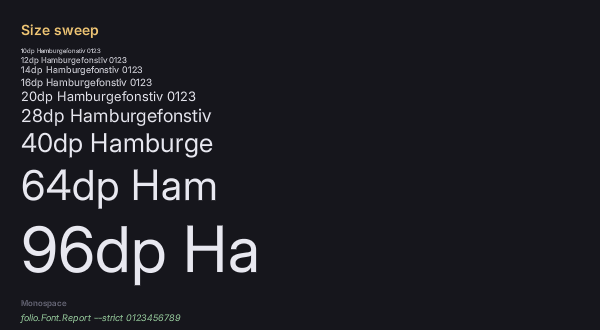
Glyphs are distance fields, so one atlas per face serves 13dp and 96dp alike.
Getting a face
font-family accepts one family only, with no fallback stack. The host registers faces, or a stylesheet declares them with @font-face.
Folio bundles Inter and Roboto Mono, so font-family: Inter works in a new project with no setup. A game adds its own by dropping files in UI/fonts/; the preview takes --font <path>.
body { font-family: Inter; font-size: 16dp; }
.code { font-family: Roboto Mono; }
A family name is one Folio registered, not a filename. The faces come from the first of these that has any: --font, the game's UI/fonts/, the plugin's bundled faces, the engine's Roboto. They are alternatives, not a stack.
The bundled two are a floor, not the palette. fonts.google.com is an open-licensed library: fetch the .ttf, put it in UI/fonts/, ship the licence beside it.
@font-face
@font-face { font-family: "Hand"; src: url(fonts/hand.ttf); }
@font-face { font-family: "Hand"; src: url(fonts/hand-bold.ttf); font-weight: bold; }
@font-face { font-family: "Display"; src: url(fonts/display-variable.ttf); font-weight: 100 900; }
src resolves against the stylesheet. font-weight takes normal, bold, 1 to 1000, or a range for a variable file. font-style takes normal or italic.
Faces are global, not per document: the first declaration of a family, style and weight is the one every document gets, for as long as the game runs.
Weight
.light  { font-weight: 300; }
.body   { font-weight: normal; }   /* 400 */
.strong { font-weight: 600; }
.heavy  { font-weight: bold; }     /* 700 */
On a variable face any value in 1-1000 drives the wght axis directly rather than snapping to the nearest cut. Values are quantised in steps of 50, so 375 and 425 are distinct instances and 375 and 380 are not.
bolder and lighter do not exist.
opsz, where a face has it, is driven automatically from the requested size. Other axes (wdth and anything custom) are pinned at registration and reached by family name:
// On the font engine, which the module owns. Style and the pinned axes are both explicit, because a
// family is what RCSS can name and everything else has to be baked into one.
FFolioModule::Get().GetFontEngine()->RegisterVariableFace(
"<path>", "Inter Condensed", Rml::Style::FontStyle::Normal, {{"wdth", 75.0f}});.narrow { font-family: Inter Condensed; }Size, and the one real trade-off
Distance-field text has no hinting and no stem snapping. At 12-14dp on a 1080p display, stem widths vary slightly more than a hinted rasteriser would give. Above that it is a wash or better. --a11y treats 12dp as a hard floor; see accessibility.
Advances are unhinted and scaled linearly from design units, so text wraps in slightly different places than a hinted rasteriser would.
Font effects
Four, and the only way to get a text shadow.
.title  { font-effect: outline(2dp #000000); }
.glow   { font-effect: glow(3dp #f0c674); }
.drop   { font-effect: shadow(2dp 2dp #000000a0); }
.soft   { font-effect: blur(4dp #ffffff40); }
All four read the field's true-distance channel, so each costs one more quad per glyph and no atlas.
Widths and offsets take dp, px or em. dp keeps its proportion to the text at every UI scale; px stays the same number of pixels.
Their reach is bounded in em, not pixels: 0.104em at the default atlas settings. outline(2px) is a twentieth of an em on 40dp text and well inside it; on 13dp text it is a sixth of an em and gets clamped. Size an effect against the text it decorates.
Textured text
fill-image fills the glyphs with a pattern instead of a flat colour:
.crt { font-effect: fill-image("/UI/art/scanlines.png" 4dp); }A path, a tile size, and an optional colour the pattern is multiplied by. Where the pattern is transparent the flat color shows through, so the two compose.
Shaping
Text is shaped with HarfBuzz: ligatures, contextual forms, attached combining marks, and the GPOS kerning a modern face ships, which a reader of the old kern table misses.
Shaping is always on. The one control is font-kerning: none, which switches off the kern feature and leaves everything else.
Shaping is per script: a string is cut into runs of one script each and each run shaped on its own, with punctuation and digits staying with whatever they follow. Right-to-left text lays out right to left. Mixing the two directions in one paragraph does not work; see known gaps.
folio.Font.Shaping 0 (or uipreview --simple-shaping) drops back to one glyph per codepoint with legacy kerning, which is what a build without HarfBuzz does. It exists for metrics diffs; text reflows when it changes.
Text properties
font font-family font-size font-style font-weight font-kerning · font-effect · text-align text-decoration text-transform text-overflow · letter-spacing line-height · white-space word-break.
line-heighthas nonormal. Always give a number, length or percentage.font-stylehas nooblique.text-overflowtakesclip,ellipsis, or a string to use in place of the ellipsis.white-space:normal,pre,nowrap,pre-wrap,pre-line.word-break:normal,break-all,break-word.
Baking and caching
Glyphs are generated on demand and cached to disk, so only the first run of a face pays for them. Tools/msdfbake font pre-bakes a face for a packaged build.
folio.Font.Report (or uipreview --font-report) prints which faces are loaded, their variation tuples, and what they cost in pages and glyphs.
If it looks wrong
A document shows no text at all. RCSS's initial font-family is empty, so nothing renders until a family is named. Set font-family on body.
Text set in Inter or Roboto Mono disappears after you add a font. Once UI/fonts/ has a face in it, the bundled two are not loaded. Put Inter in UI/fonts/ too, or name your own family.
An @font-face has no effect. The first declaration of a family, style and weight wins for as long as the game runs; a later one naming a different file is ignored with a warning, which --strict fails on. A face the host registered first also wins. Give the new face its own family name.
Small body text looks uneven. Distance-field text is unhinted, so at 12-14dp on a 1080p display stem widths vary slightly. Look at your smallest text on the target display before committing to it.
Words wrap differently at another resolution. Line breaks do not survive a change of dp ratio: an advance is a whole number of pixels at each size, so words move. Never size a container to fit its content exactly at one ratio; check two with --dp-ratio.
text-shadow does nothing. It does not exist. Use font-effect: shadow(...).
An outline or glow is thinner than asked on small text, and widening it changes nothing. Effects are capped at 0.104em, and an effect at three times the cap looks identical to one at the cap. The log says a font effect reaches further than the field describes and was clamped to 0.104 em. Size the effect to the text, use filter: glow(...) on the element for a wide halo (see shader filters), or raise pxrange when baking, at a quadratic cost in atlas area.
fill-image cannot find a sprite. It names a file, not a sprite: a font effect is built while the stylesheet is parsed and has no route to a spritesheet. Give it a path.
The fill-image pattern stays still while the text scrolls. The pattern is anchored to the screen, not to the text, so it is the wrong tool for anything meant to travel with the words.
An outline, glow or shadow stays flat under fill-image. It only textures the fill, as a front layer over the glyph.
fill-image disappears inside a filter, a mask-image or an opacity on an ancestor. Those paths bind one texture and the pattern is skipped.
text-align: justify leaves the text left-aligned. Justification is not implemented; the value parses and does nothing.
A screen holds more font pages than expected. Run folio.Font.Report to catch one that instantiated nine weights.
Where to go next
- Rich text and the typewriter: emphasis inside a translatable line, names shared across the game, and text that types itself out.
- Vector art: the same distance fields, for icons.
- Localisation: translated strings run about 40% longer; check with
--culture pseudobefore it matters. - Accessibility: the size floor and the contrast check.
- UI_CONVENTIONS.md §6: the full reference.