The shader decorator
Three effects RCSS has no syntax for, reached through one decorator:
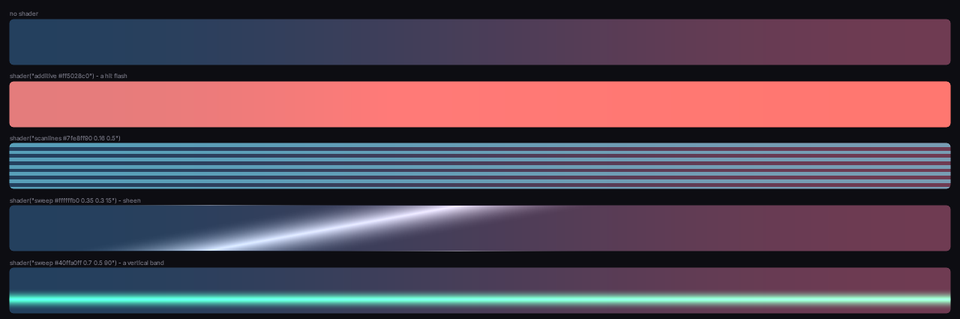
.hit   { decorator: shader("additive #ff5028c0"), image(panel); }
.crt   { decorator: shader("scanlines #7fe8ff90 0.16 0.5"), image(panel); }
.sheen { decorator: shader("sweep #ffffffb0 0.35 0.3 15"), image(panel); }
The set is fixed; a stylesheet cannot add to it. A name Folio does not know warns once and draws nothing.
additive <colour> | A flat wash that adds instead of covering. Hit flashes, charge glows, damage. |
scanlines <colour> <period> <thickness> | Period and thickness as fractions of the box. |
sweep <colour> <position> <width> <angle> | A soft band across the box, angle in degrees. Card sheens, loading shimmers. |
Additive blending, which is the point
additive and sweep add rather than cover; RCSS has no blend modes and no other route to it.
No blend state is involved. RmlUi composites premultiplied, so a colour written with zero alpha adds to whatever is under it:
/* Adds a red wash without darkening anything. */
.hit { decorator: shader("additive #ff502800"), image(panel); }
That works identically in both renderers, which a real blend state would not.
Order matters, and it is backwards from what you expect
Multiple decorators paint in reverse source order: the first named is on top, exactly like CSS background-image layers.
An effect listed after an opaque background is painted underneath it and appears to do nothing:
/* Wrong. The sheen is under the base and invisible. */
.btn { decorator: image(btn_base), shader("sweep #ffffffb0 0.35 0.3 15"); }

/* Right. */
.btn { decorator: shader("sweep #ffffffb0 0.35 0.3 15"), image(btn_base); }
This is the single most common reason a shader decorator "does nothing".
Animating one
The decorator's arguments are not animatable: there is no interpolation between two shader() strings. Animate the element instead:
@keyframes flash {
	from { opacity: 1; }
	to   { opacity: 0; }
}

.hit-overlay {
	position: absolute; left: 0; top: 0; width: 100%; height: 100%;
	pointer-events: none;
	decorator: shader("additive #ff502800");
	animation: 0.25s cubic-out flash;
}
An overlay with pointer-events: none can be added, animated and removed without touching the element it decorates.
For a sweep that travels, animate transform: translateX on an overlay wider than its container.
Where to go next
- Images and sprites: the rest of the decorator vocabulary, and the ordering rule again.
- Animation: what is cheap to animate.
- UI_CONVENTIONS.md §5: the complete effect list.