Input prompts
"Hold E to file a complaint." E has to be whatever the player bound, become a face button the moment they pick up a pad, and look like something without waiting on an artist.
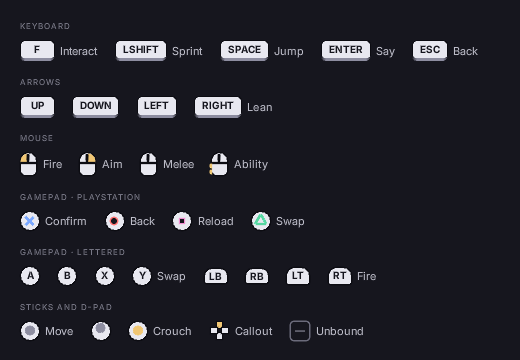
What a prompt is made of
Prompts = NewObject<UFolioPromptSet>(this);
Prompts->Add(TEXT("Interact"), TEXT("File a complaint"));
Prompts->Add(TEXT("Skip"), TEXT("Skip"));
Prompts->Refresh(GetOwningLocalPlayer());

Document->BindViewModel(TEXT("prompts"), Prompts);<span class="prompt" data-for="p : Prompts" data-if="p.bBound">
<span class="pg pg-key">{{ p.Glyph.Cap }}</span>
<span class="pg-label">{{ p.Label }}</span>
</span>Game code names the actions once. Refresh resolves each to the key the player has bound and filters by what they are holding: a pad in hand never shows F. Call it when the screen opens, when the device changes, and after a rebind; it is cheap.
UFolioPromptSet::IsGamepadActive() says which device that is, and SetGamepadActive(bool) switches it as real input would, for an attract mode or a capture that has to show both.
bBound is false when nothing is bound. Hide the row: a prompt for an unbound action sends the player looking for a key that does nothing.
Where the picture comes from
A project picks the order of three sources per device family:
// Keyboard drawn, gamepad from licensed art with a drawn fallback.
Folio::SetGlyphSources(
    { EFolioGlyphSource::Drawn },
    { EFolioGlyphSource::Image, EFolioGlyphSource::Drawn });
Drawn | The stylesheet's own shapes. No art, no atlas, no licence, sharp at any size, recolours with the theme. |
Sprite | A sprite named by the project's FFolioKeyGlyph table. |
Image | A texture. This is how CommonInput's controller art arrives: the brush is resolved, its texture registered, and the prompt gets a folio:// source. |
The default is drawn everywhere, so prompts work with no art and no CommonInput data. ResolveGlyph always fills in Cap whichever source wins, so a missing texture degrades to a keycap rather than a blank.
Two lists because the answer usually differs: a drawn keycap beats a picture of a keyboard, while a PlayStation face button has licensed art, and drawing your own is a trademark question.
Shape names the drawn shape as the class after pg-: key, face, bumper, trigger, dpad, stick, or mouse and its button (mouse left). So a pad's A is drawn as a face button, from one element:
<span data-attr-class="'pg pg-' + p.Glyph.Shape">{{ p.Glyph.Cap }}</span>The mouse, the stick and the d-pad have children of their own; rcss/recipes/prompts.rml shows each.
Kind says which won (drawn, sprite or image), so markup picks a branch instead of testing three fields for emptiness:
<span class="pg pg-key"   data-if="p.Glyph.Kind == 'drawn'">{{ p.Glyph.Cap }}</span>
<span class="pg pg-sprite" data-if="p.Glyph.Kind == 'sprite'"><img data-attr-sprite="p.Glyph.Sprite"/></span>
<span class="pg pg-image"  data-if="p.Glyph.Kind == 'image'"><img data-attr-src="p.Glyph.Image"/></span>
The drawn set
/folio/lib/prompt.rcss draws keycaps, mouse buttons, gamepad faces, bumpers, triggers, sticks and the d-pad from boxes, borders and radii. rcss/recipes/prompts.rml shows every one.
If you restyle them:
- A keycap's minimum width is what holds it open. An automatic width comes out as one side's padding plus the text, so a cap sized purely by its label runs its last letter under the border.
- PlayStation's marks are drawn: cross from two bars, circle a ring, square an outline, triangle three bars each turned into one side. A letter would be wrong on that platform.
- A face pad's children position against its padding box, so a 30dp pad with a 2dp border centres on 13, not 15. Getting this wrong pushes every mark down and right by the border width.
- Corners beat joins. A chevron drawn as two bars leaves a wedge where their outer corners nearly meet; drawn as a square with two borders it cannot fail to meet itself.
Naming keys
Folio::LabelFor gives the keycap's text: the project's FFolioKeyGlyph row if there is one, else the key's own display name. A table is worth it for the long ones: Left Shift is a wide cap and LSHIFT is not.
Folio::RegisterGlyphTable(MyGlyphTable);Repeatable, and later rows win, so a platform can override the gamepad rows without restating the keyboard ones.
Where to go next
- A controls screen: letting the player change what these show.
- Images and textures: sprites, and what
folio://is. - Input and navigation: the device classes markup can style against.