Localization
Folio's text goes through Unreal's own localization pipeline (the same commandlets, the same archive format, the same PO export, the same Translation Editor) as its own localization target. A translator receives one Folio.po holding your screens and nothing else.
One extra step is Folio-specific: a script has to run before Unreal gathers. GatherTextFromSource scans C++ for NSLOCTEXT and cannot read markup, so the script reads your documents and writes the declarations. Skip it and the gather succeeds with your UI text quietly missing.
1. Key every user-visible string
Put a data-loc key on the element, and leave the English text inline:
<h1 data-loc="title">Settings</h1>
<button data-loc="apply">Apply</button>
<p data-loc="raytracing_hint">Not supported on this device</p>
The source text stays in the document, so it is readable and previewable. A translation is stored against the key.
Keys only need to be unique within their file. The namespace comes from the path:
| Document | Namespace |
|---|---|
UI/screens/settings.rml | Folio.Settings |
UI/screens/main_menu.rml | Folio.MainMenu |
anything under UI/lib/ | Folio.Common |
Shared components land in Folio.Common because a button's label belongs to every screen that uses it.
The key goes on an element holding nothing but text
Translating replaces the element's entire contents, so this does not work:
<!-- Wrong: the span is swallowed into the string and comes back as visible markup -->
<p data-loc="hint">Press <span class="key">E</span> to open</p>
Split it, and key the parts:
<p><span data-loc="hint_before">Press</span> <span class="key">E</span>
   <span data-loc="hint_after">to open</span></p>
Awkward, and unavoidable: a translator needs to reorder those words, so they have to be separate strings.
Except for prose, where the markup travels in the string
A line of dialogue with emphasis in it is one string, not three, so a translator can move the emphasis onto whichever word carries it in their language. That is what <text> is for:
<text data-loc="line_1">You <angry>must</> go to the {tag:Place.Mountain.Temple}.</text><angry> is a style rather than an element and {tag:} is a name from UI/terms rather than a binding, so all of it survives being a string. One key covers the line. See rich text; the rest of this page applies to it unchanged.
Values from your game are not translatable strings
A number, a player name, a percentage: those arrive through a data binding and are game state. Do not key them:
<span>{{ Health }}</span>              <!-- no data-loc, and none wanted -->
<span data-loc="health_label">Health</span>   <!-- the label is a string -->
For text that is not translatable (a version number, a debug readout) mark it data-noloc so the checks stop asking about it.
2. Set the project up, once
Copy Folio's template into your project:
Plugins/Folio/templates/Config/Localization/Folio.ini -> Config/Localization/Folio.iniThen three lines in Config/DefaultGame.ini. The first is easy to miss: without it the gather is correct and every string still renders in English, because nothing has told the runtime the target exists:
[Internationalization]
+LocalizationPaths=%GAMEDIR%Content/Localization/Folio

[/Script/UnrealEd.ProjectPackagingSettings]
+CulturesToStage=en
+CulturesToStage=fr
If your project already has its own localization target, exclude the generated header from it, or the same strings are gathered into two manifests:
; in Config/Localization/<YourTarget>.ini
ExcludePathFilters=Source/Generated/*
Do not use the Localization Dashboard to change gather settings. It keeps its own copy of those settings and regenerates Config/Localization/Folio.ini from them, dropping anything it does not know about, including the directory holding the generated declarations, which silently removes every string that came from markup. Use the Dashboard for the Translation Editor and nothing else. The template says so at the top of the file.
3. Gather
From your project directory:
./Plugins/Folio/scripts/loc.shIt runs on Linux and in git bash on Windows. Set UE_ROOT if engine discovery fails.
In order:
gather_rml.pywalks your.rmlfiles and writesSource/Generated/FolioText.h: oneNSLOCTEXTper key. Nothing includes that header. It is read by the gatherer, not compiled. Commit it, so a machine that has not run the script can still gather.- Unreal's
GatherTextruns, and picks that header up as ordinary source.
The script fails, and stops the gather, on anything producing untranslatable or ambiguous text: a duplicate key meaning two different things, a key with no text under it, a key on an element containing other elements, a key on a bound value, or two documents deriving the same namespace.
It also writes Source/Generated/FolioText.notes.md, the brief that goes to a translator with the PO: what the tags in a <text> mean, what each {tag:} prints in English, and which strings carry which. Unreal's PO export has no room for a note against a string, so it travels beside it.
Terms are gathered as their own namespace, Folio.Terms, keyed by tag. A place name is translated once there and every line that mentions it follows.
Re-run it whenever you add or change user-visible text.
--script-only regenerates the header alone, the fast check while writing markup. --gather-only skips it.
4. Translate
Your strings are in Content/Localization/Folio/<culture>/Folio.archive, exported as Folio.po for whoever does the translating, and imported back by the same gather command.
Because the UI is its own target, Folio.po is a self-contained handoff. The Translation Editor in the Localization Dashboard works normally.
Check what comes back
./scripts/loc.sh --check-po Folio.poMarkup travels inside the strings, so a translation can be a good string and still be text the game cannot read. Every translated line is parsed: an unclosed <angry>, a retyped {tag:Place.Mountain.Tmple} or an invented style is an error naming the line in the PO. A translator dropping a term is a warning rather than an error: writing a name out in full is right when a language inflects it and the table has no form for that case.
Run it on everything that comes back before importing it.
5. Check it
folio.Loc.Report UI/screens/settings.rmlEvery key in the document, with what it resolved to:
localisation of 'UI/screens/settings.rml' in namespace 'Folio.Settings', culture 'fr':
  title                    [loc]    Paramètres
  apply                    [loc]    Appliquer
  raytracing_hint          [source] Not supported on this device
  35 keyed string(s), 34 with a translation
[loc] found a translation. [source] did not, and is showing English. This is the only way to tell a missing translation from a missing key, which look identical on screen: a key with no translation reports [source], while text with no key does not appear in the list at all.
Before any translation exists, the preview tool inflates and accents every string:
uipreview.exe ui\screens\settings.rml --root . --culture pseudo --strict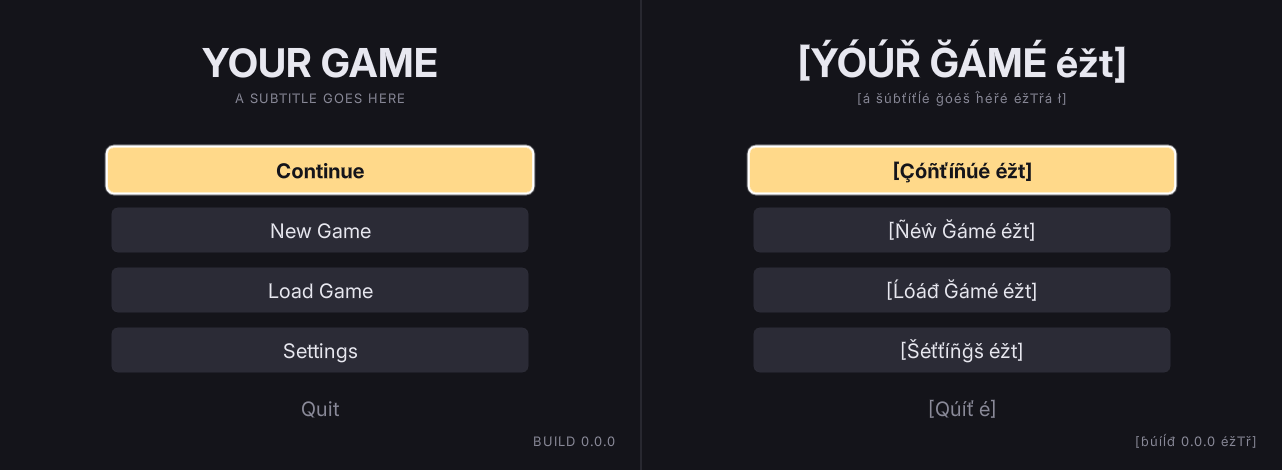
Pseudo-localization finds the layout that only fits English. It lengthens each string by about 40%, accents the letters and wraps it in brackets: if the closing bracket is missing, that string is being clipped. Values arriving through a binding are left alone, so a plain number beside an accented label is not a missed string.
--strict turns every warning into a failure, including text with no key. Run it before committing a document.
The screen reader's own words
A screen reader is about a third its own vocabulary ("check box", "not checked", "unavailable", the name of the comma key), and none of it comes out of a document. Those are NSLOCTEXT under the FolioAccessibility namespace in Source/Folio/Private/FolioAccessibilityText.cpp, so Unreal's ordinary source gather finds them with no extra step and they land in your project's own target rather than in the Folio one the markup goes to. Nothing here needs the script from step 3.
If you translate them: they are format strings with ordered arguments, because "deleted a" is the same sentence in a different order in other languages. A number a control produced goes through FText::AsNumber, so a slider reads its value the way the culture writes one.
Leave them untranslated and the menus are localised while the voice reading them is not: the player who cannot see the translated screen hears the English.
If something looks wrong
- Every string reports
[source]and the archive has translations. The target is not loaded. Check+LocalizationPaths=%GAMEDIR%Content/Localization/Foliois inDefaultGame.ini. This is the most common setup mistake. - Gather succeeded but the UI text is not in the manifest. The script did not run. Use
loc.shrather than the Dashboard's Gather button, which cannot run it. - Every string reports
[source]in a culture that has translations. The namespace is not matching. Check the document's path against the table above; a file that moved changes its namespace, and the old translations stay under the old one. - One string reports
[source]. Ordinary missing translation. It appears in the PO export as untranslated. - A translated string shows visible
<span>markup. The key is on an element containing other elements. See above. - A string does not appear in
folio.Loc.Reportat all. It has no key, or it isdata-noloc, or its text comes from a binding. - Text changes in the editor but not in a packaged build. The
.locreswas not regenerated, or the culture is not inCulturesToStage. - The same string appears twice in a word count. Your game's target is also gathering
Source/Generated. Exclude it there.